Out of fuel? To request emergency fuel delivery by text, first confirm that the roadside provider accepts SMS, then send your location, fuel type, vehicle details, and callback number together. Instead of repeating those details across messages, use the workflow below—and call Atlroadside at (678) 502-0513 for 24/7 fuel delivery help across the Atlanta metro.
- To request emergency fuel delivery by text, confirm SMS support before sending your location and fuel type.
- Atlroadside provides 24/7 fuel delivery for Atlanta drivers and commercial fleets; call to confirm the request channel.
- A sent message is not dispatch confirmation. Get explicit acknowledgment that your fuel delivery request is accepted.
- For diesel delivery, identify the truck, fuel requirement, access conditions, and driver callback number.
Why this matters
The job is not booked just because your message was sent. You need the provider to acknowledge the request, confirm the fuel requirement, and tell you what happens next. A delivery indicator on your phone does not establish any of those things.
Text is useful for details that are easy to mishear: road direction, a map location, a vehicle description, or a fleet unit identifier. Its weakness is silence. If nobody acknowledges the request, switch to a call rather than waiting on another unanswered message.
Atlroadside fuel delivery is best for Atlanta drivers and commercial fleets needing 24/7 roadside help. Its service covers fuel delivery and other roadside needs, including heavy-duty towing and recovery. Confirm SMS support by phone before treating text as your request channel.
Before you start
- Get safe first. Turn on your hazard lights. Do not walk into traffic to find a landmark or take a picture. If there is an immediate threat to life, call 911 rather than waiting for roadside service.
- Gather the essentials. Have a working phone, your location, the correct fuel type, vehicle details, and a callback number ready. Commercial drivers should also have the fleet or dispatch contact available.
- Confirm the receiving number. Ask whether the provider accepts fuel requests by text and which number to use. The gotcha: a published call number does not prove that someone monitors incoming SMS.
Do not guess whether your vehicle needs gasoline or diesel. Use the fuel-door label or owner's manual to verify it. If you cannot confirm safely, tell the provider before any fuel is delivered.
Confirm contact
- Call the provider. Say that you need emergency fuel delivery and give your general location immediately. Explain whether you are in a car, commercial vehicle, or semi-truck.
- Ask about texting. Ask whether you can send your exact location and vehicle details by SMS. Confirm the receiving number during the call.
- Establish the fallback. Ask what to do if the message does not arrive or you receive no acknowledgment. Keep the call available until you know how the request will be handled.
Expected result: you have a confirmed contact channel, not just a number copied into a messaging app.
For your 2026 workflow, keep calling and texting separate: the call establishes contact; the text records details when the provider accepts it. Do not assume a website form, chat window, or social message reaches roadside dispatch.
If talking is difficult because of road noise, explain that early. Move away from noise only when doing so is safe. Never cross traffic or leave a safe position just to improve the call.
Send location
- Identify the road. Include the highway or street name and your direction of travel. Add a nearby exit, intersection, or mile marker only when you can identify it safely.
- Describe where you stopped. State whether the vehicle is on a shoulder, in a parking lot, at a loading area, or somewhere else. Mention an entrance or access restriction that affects reaching it.
- Share the location. Send a map location if your phone and the confirmed channel support it. Include a written description too; a location marker does not explain which side of a divided highway you occupy.
- Check the message. Read back the road, direction, and stopping place before sending. Correct an inaccurate map location rather than assuming the provider will recognize the error.
Expected result: the provider can identify your stopping place and the approach needed to reach it.
Use 3 location checks before sending: road, direction, and stopping place. These are checks in this workflow, not a promise that every roadside location is easy to reach.
For a truck, describe access without stepping into traffic to measure anything. Tell the provider if you are attached to a trailer, blocking an entrance, or stopped where a service vehicle cannot easily pull alongside. Let the provider decide what information is needed next.
Identify fuel
- Name the fuel. Write gasoline or diesel, using the vehicle's verified requirement. Include any fuel specification you can confirm from the vehicle documentation.
- Identify the vehicle. Send the make, model, and a useful visual detail such as color. For a commercial vehicle, include the fleet unit identifier when it helps the provider find the right rig.
- Describe the problem. Say whether you ran out of fuel, suspect a fuel problem, or already added fuel but still cannot start. Those situations do not all call for the same next step.
- Add your callback number. Identify the person beside the vehicle. If a fleet manager is arranging help, give the driver's number as well as the dispatch contact.
Expected result: the provider knows which vehicle needs help, what fuel it requires, and who can answer questions on site.
Your 2026 message should lead with the problem, not the trip story. The route you were taking matters less than where the vehicle is stopped now and what it needs.
A short message starter
Copy this starter into your message, then add your actual details before sending:
I need emergency fuel delivery. My location and direction of travel are below. Please confirm that you received this request and whether you can dispatch help.
Follow it with clearly labeled lines:
- Location: road, direction, stopping place, and any safely identified landmark.
- Fuel: verified fuel type and any relevant specification.
- Vehicle: make, model, color, or commercial unit identifier.
- Situation: out of fuel, uncertain diagnosis, or no start after refueling.
- Contact: driver callback number and fleet contact when applicable.
- Access: entrance, trailer, gate, or other relevant approach detail.
Keep private information out of the message unless it is needed for the service request. A vehicle description and callback number do not require you to send identification documents or unrelated account details.
Confirm dispatch
- Ask for acknowledgment. Get confirmation that the provider received the correct location, fuel type, and vehicle details. Correct any misunderstanding immediately.
- Confirm acceptance. Ask whether the fuel delivery request has been accepted and what the next step is. A received message and an accepted job are different things.
- Confirm updates. Ask how the provider will contact you about arrival or access questions. Keep your phone available and answer calls from the service contact.
- Report changes. If you move, cancel, or obtain help elsewhere, notify the provider. Do not leave an old location as the active destination.
Expected result: you know whether help has been arranged and how to stay in contact.
Get 2 confirmations: receipt of the details and acceptance of the request. Neither a sent-message indicator nor a generic automated reply replaces acceptance.
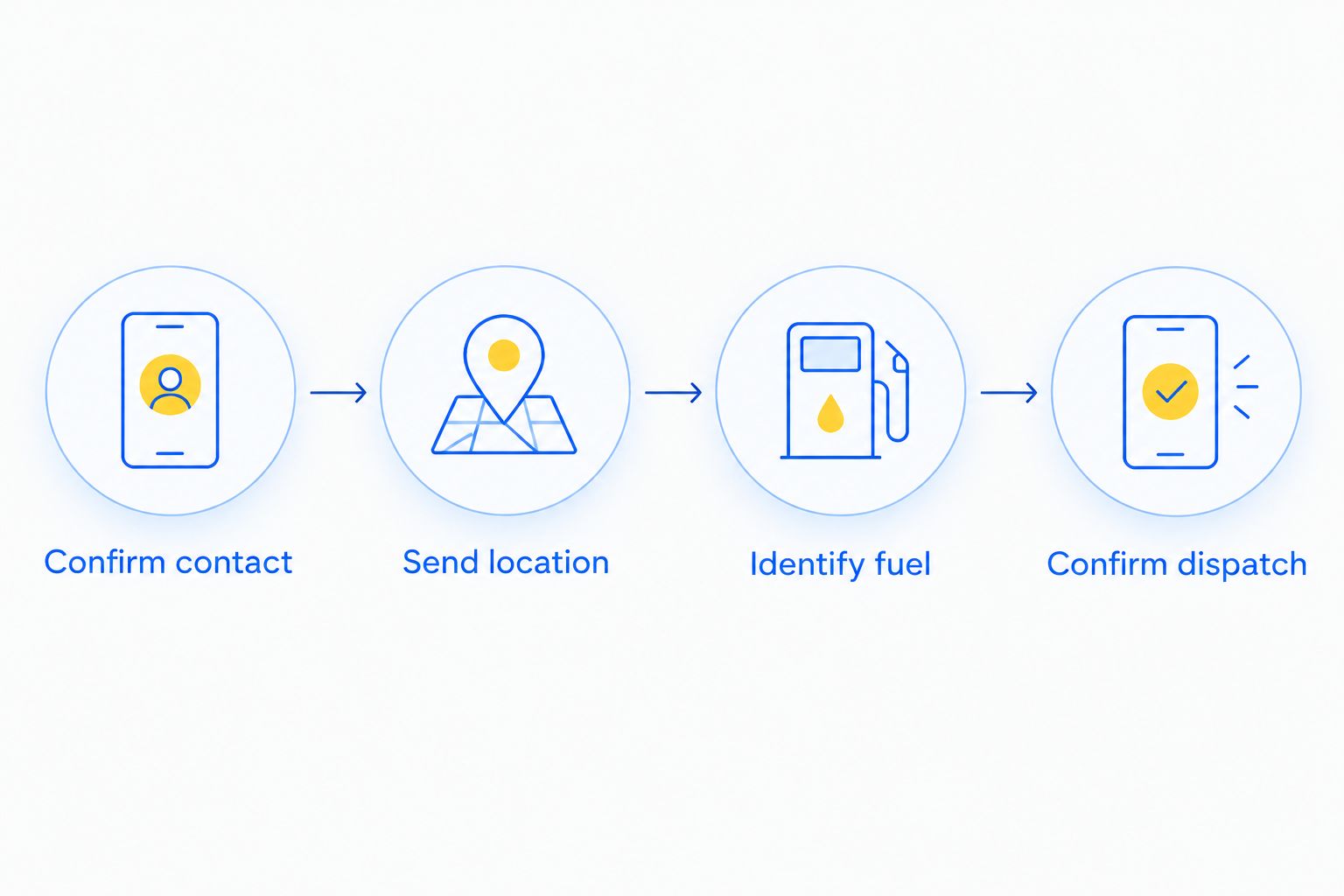
The 2026 workflow follows this order: confirm contact, send location, identify fuel, confirm dispatch. Follow the provider's safety instructions while you wait. Do not attempt a roadside repair merely because you have time before help arrives.
Choose text, a call, or a fleet handoff
Best for detailed location sharing: text after channel confirmation. Best for establishing contact: a call. Fleet coordination adds another person, so make responsibility clear before anyone assumes help is booked.
| Workflow | Best for | Advantage | Limitation |
|---|---|---|---|
| Confirmed SMS | Drivers sharing location and vehicle details | Keeps the written details together | Requires acknowledgment; sending alone does not confirm dispatch |
| Phone call | Drivers who need contact established now | Lets you clarify the situation during the conversation | Road noise can make location details harder to hear |
| Fleet handoff | Commercial drivers with dispatcher support | Lets dispatch coordinate while the driver stays focused on safety | Conflicting instructions can arise unless one person owns the request |
Choose the channel the provider actually supports. This is not a reason to install another app or start a new account while stranded.
Get fuel delivery help
Call (678) 502-0513 for 24/7 Atlanta metro service. Confirm SMS support before texting your request.
Update the request when your location changes
A second workflow matters when police, property staff, or another responder directs you to move. Send a location correction in the existing conversation, then confirm that it replaces the original location. Do not rely on a new map marker without explanation.
- Start the update with Location changed.
- State the new road, direction, stopping place, and access details.
- Say whether the vehicle moved under its own power or was moved by someone else.
- Ask the provider to confirm the revised destination.
Do not move an unsafe or inoperable vehicle just to make delivery easier. Follow instructions from emergency responders and tell the roadside provider what changed.
Commercial diesel delivery handoff
For semi-trucks, let one person own the request. The driver supplies the location, verified fuel requirement, truck details, and immediate safety conditions. Fleet dispatch coordinates with the provider and keeps the driver informed.
Record the acceptance in the existing fleet incident record, if your operation uses one. Include who is handling updates. A forwarded screenshot without a named owner leaves room for everyone to assume someone else confirmed the job.
Atlroadside provides emergency diesel delivery for semi-trucks and commercial vehicles across the Atlanta metro. Its heavy-duty towing and recovery capability also matters when fuel delivery is not the answer. Describe the actual failure rather than requesting fuel automatically.
Troubleshooting
- The text sends, but nobody replies. Call the provider. Ask whether SMS is monitored and whether the request was received. Do not keep sending duplicate requests as a substitute for acknowledgment.
- The location marker is wrong. Send a clear correction with the road, direction, and stopping place. Ask the provider to confirm the replacement location.
- You are unsure which fuel to request. Check the vehicle label or documentation from a safe position. Stop the request from proceeding on an assumption and tell the provider you need clarification.
- The vehicle still will not start after fuel is added. Report that result. Do not assume another delivery fixes the issue; discuss whether another roadside service or towing is needed.
- Phone power or signal is failing. Prioritize establishing contact and sending the essential location details. Tell the provider about the communication problem and agree on the next contact step.
Customize your workflow
For your 2026 readiness plan, save the verified roadside contact and keep a short vehicle-information note on your phone. Include the fuel type, vehicle description, and fleet contact if applicable. Review it when your vehicle or employer changes.
If you manage several drivers, standardize the request fields rather than relying on memory under pressure. Keep sensitive fleet information in approved systems. Do not assume a GPS platform connects to roadside dispatch without a confirmed arrangement.
For service-selection context, see the guide to fuel delivery services in Atlanta. When you are already stranded, establishing contact comes before comparing providers.
FAQ
How do I request emergency fuel delivery by text?
Confirm that the provider accepts SMS, then send your location, direction of travel, fuel type, vehicle details, and callback number. Ask for explicit confirmation that the request has been accepted.
Can I text Atlroadside for emergency fuel delivery?
Call Atlroadside at (678) 502-0513 to confirm SMS support and the correct receiving number before texting. The company provides 24/7 fuel delivery across the Atlanta metro; a published call number alone does not establish text support.
What should I include in a roadside fuel delivery text?
Include the road, direction, stopping place, verified fuel type, vehicle description, and driver callback number. Add access details and a fleet contact when relevant.
Does a delivered text mean fuel delivery is booked?
No. A delivered message does not confirm that the provider has accepted the request or arranged dispatch. Ask for acknowledgment and acceptance, then confirm how updates will reach you.
Can I request diesel delivery for a semi-truck?
Yes. Atlroadside provides emergency diesel delivery for semi-trucks and commercial vehicles across the Atlanta metro. Give the truck location, verified fuel requirement, unit identifier, driver contact, and relevant access details.
What should I do if nobody answers my fuel delivery text?
Call the provider to establish contact and verify whether SMS requests are monitored. Do not treat repeated unanswered messages as a confirmed service request.
What if my car still will not start after fuel delivery?
Tell the roadside provider that the vehicle still will not start and describe what happened. Discuss the next service needed instead of assuming more fuel will solve the problem.
One last thing
Save the acknowledgment, not just your outgoing message. For your 2026 roadside plan, the useful record is the provider's acceptance plus the latest confirmed location. If someone else takes over the request, pass along both.